Helping new users understand complex floor planning software through guided onboarding.
Role: Sole Product Designer (with mentorship from a Chief Design Officer)
Timeline: 5 week-long internship for my Springboard UI/UX certification
Constraints: Work within existing software limitations; Design an onboarding tutorial that is accessible for all users
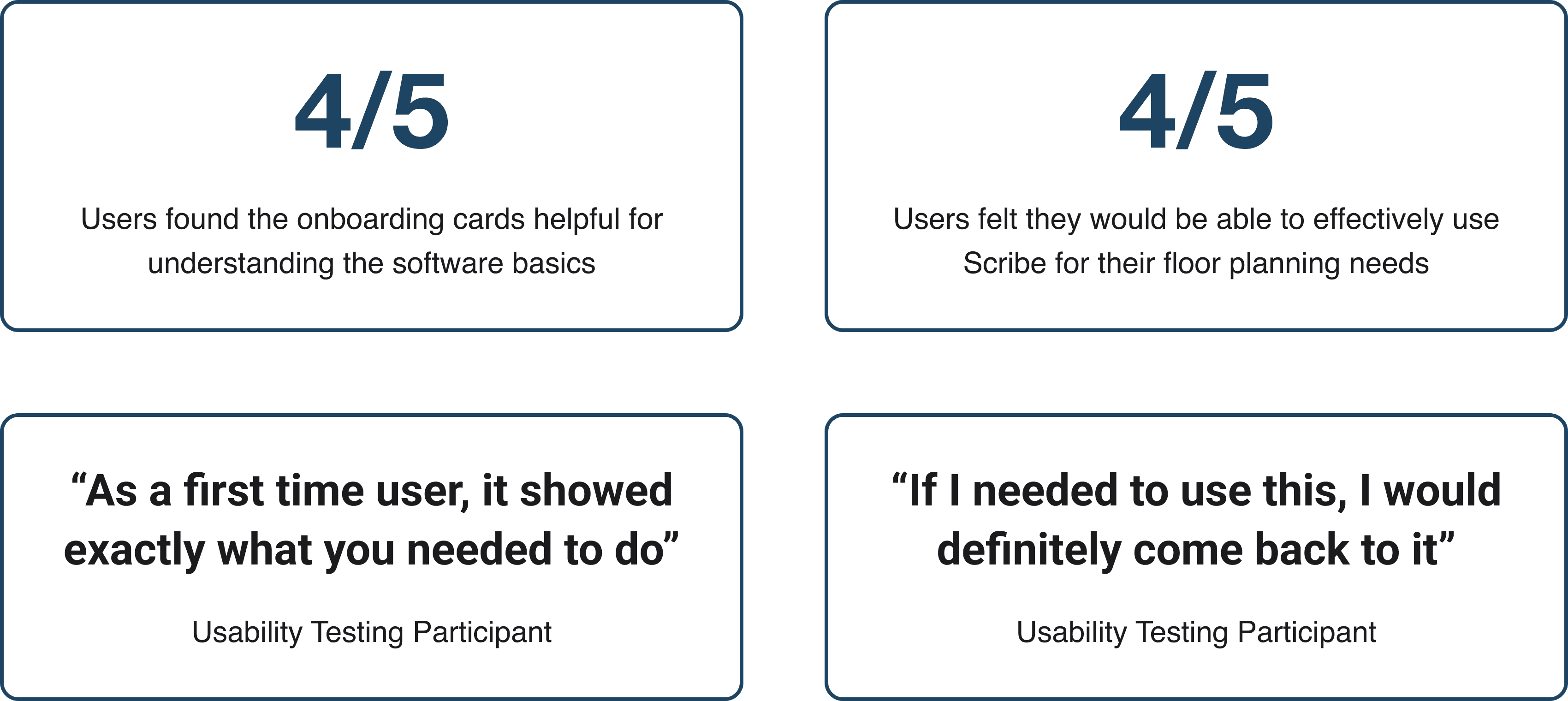
Impact: 4/5 users found the onboarding cards helpful for understanding the software basics; 4/5 users felt they would be able to effectively use Scribe for their floor planning needs
Overview
Scribe is a floor planning software onboarding concept designed to help new B2C users understand and complete core planning tasks with more confidence.
Problem
New users were bouncing after sign up because they were unsure how to use Scribe’s core floor planning tools.
Guidance Model
Making complex software approachable.
Scribe’s onboarding was reframed around plain language, visual guidance, and task based instruction. The goal was to help users understand the software basics without needing prior floor planning experience.

Core Task Clarity
Teaching the actions that caused friction.
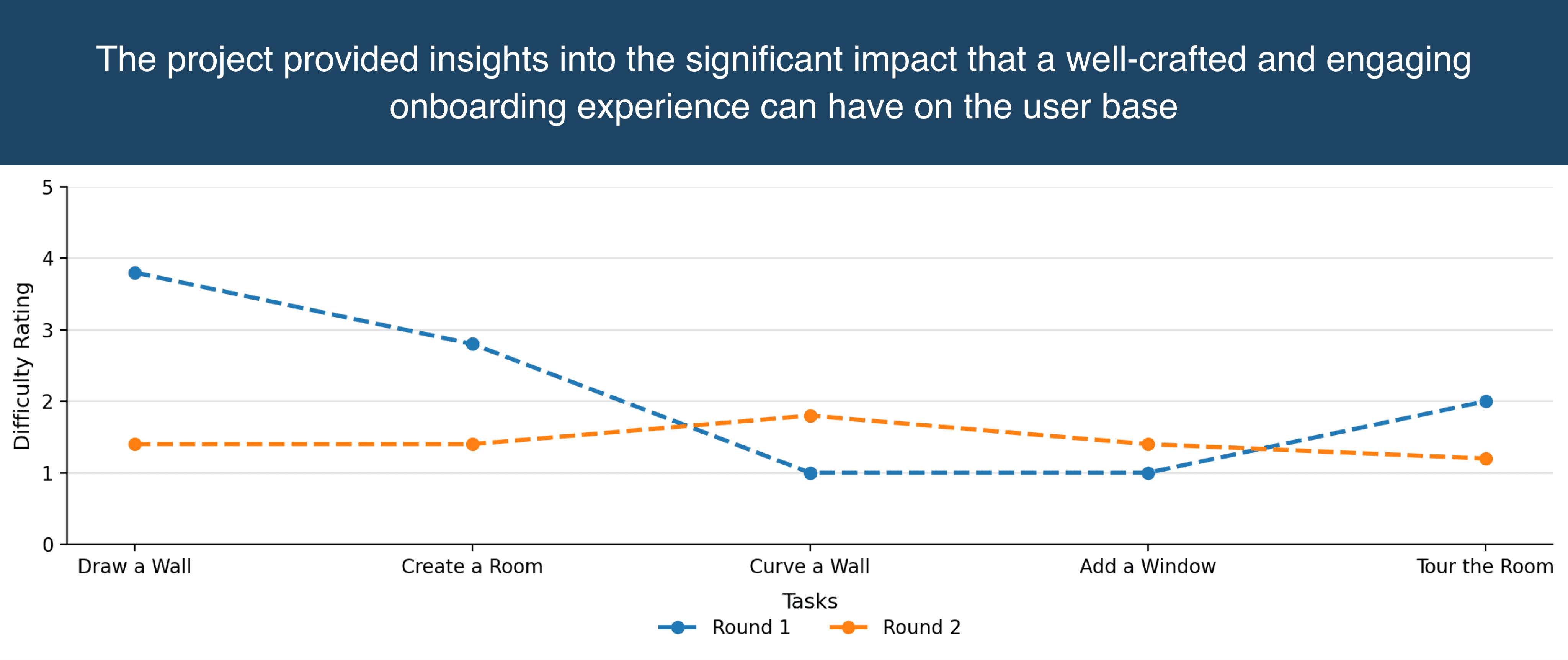
Testing showed that users struggled with foundational actions like drawing a wall and creating a room. The tutorial focused on clarifying these tasks so users could complete the basic floor planning workflow independently.

Onboarding Structure
Reducing uncertainty after sign up.
The onboarding flow was structured to guide users from orientation to action without overwhelming them. Each step introduced only the information needed to understand the next task.

User Profiles
Adapting guidance to different needs.
User profiles were added to tailor the onboarding experience around different levels of familiarity and intended use. This gave novice users clearer support while allowing more advanced users to explore relevant features.

Final Execution
Combining instruction, visuals, and interaction.
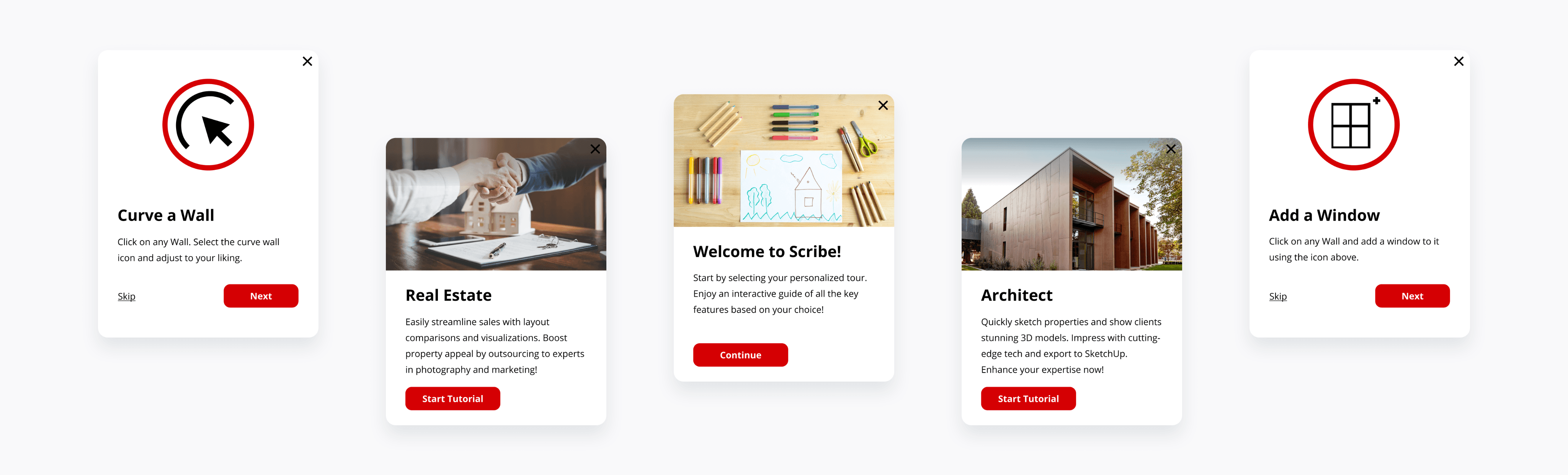
The final design used concise copy, engaging visuals, and tutorial cards to make the software feel easier to learn. Video based guidance further clarified the most difficult tasks without adding unnecessary complexity.

Impact
Improving understanding and confidence.
Testing showed that users found the onboarding cards helpful and felt more capable of using Scribe for floor planning. The final onboarding direction supported Apex’s goal of making Scribe more accessible to a B2C audience.
Helping new users understand complex floor planning software through guided onboarding.
Quick Read
Full Case Study
Role: Sole Product Designer (with mentorship from a Chief Design Officer)
Timeline: 5 week-long internship for my Springboard UI/UX certification
Constraints: Work within existing software limitations; Design an onboarding tutorial that is accessible for all users
Impact: 4/5 users found the onboarding cards helpful for understanding the software basics; 4/5 users felt they would be able to effectively use Scribe for their floor planning needs
Overview
Scribe is a floor planning software onboarding concept designed to help new B2C users understand and complete core planning tasks with more confidence.
Problem
New users were bouncing after sign up because they were unsure how to use Scribe’s core floor planning tools.
Core Task Clarity
Teaching the actions that caused friction.
Testing showed that users struggled with foundational actions like drawing a wall and creating a room. The tutorial focused on clarifying these tasks so users could complete the basic floor planning workflow independently.
Onboarding Structure
Reducing uncertainty after sign up.
The onboarding flow was structured to guide users from orientation to action without overwhelming them. Each step introduced only the information needed to understand the next task.
User Profiles
Adapting guidance to different needs.
User profiles were added to tailor the onboarding experience around different levels of familiarity and intended use. This gave novice users clearer support while allowing more advanced users to explore relevant features.
Final Execution
Combining instruction, visuals, and interaction.
The final design used concise copy, engaging visuals, and tutorial cards to make the software feel easier to learn. Video based guidance further clarified the most difficult tasks without adding unnecessary complexity.
Guidance Model
Making complex software approachable.
Scribe’s onboarding was reframed around plain language, visual guidance, and task based instruction. The goal was to help users understand the software basics without needing prior floor planning experience.
Impact
Improving understanding and confidence.
Testing showed that users found the onboarding cards helpful and felt more capable of using Scribe for floor planning. The final onboarding direction supported Apex’s goal of making Scribe more accessible to a B2C audience.
Helping new users understand complex floor planning software through guided onboarding.
Quick Read
Full Case Study
Role: Sole Product Designer (with mentorship from a Chief Design Officer)
Timeline: 5 week-long internship for my Springboard UI/UX certification
Constraints: Work within existing software limitations; Design an onboarding tutorial that is accessible for all users
Impact: 4/5 users found the onboarding cards helpful for understanding the software basics; 4/5 users felt they would be able to effectively use Scribe for their floor planning needs
Overview
Scribe is a floor planning software onboarding concept designed to help new B2C users understand and complete core planning tasks with more confidence.
Problem
New users were bouncing after sign up because they were unsure how to use Scribe’s core floor planning tools.
Core Task Clarity
Teaching the actions that caused friction.
Testing showed that users struggled with foundational actions like drawing a wall and creating a room. The tutorial focused on clarifying these tasks so users could complete the basic floor planning workflow independently.
Onboarding Structure
Reducing uncertainty after sign up.
The onboarding flow was structured to guide users from orientation to action without overwhelming them. Each step introduced only the information needed to understand the next task.
User Profiles
Adapting guidance to different needs.
User profiles were added to tailor the onboarding experience around different levels of familiarity and intended use. This gave novice users clearer support while allowing more advanced users to explore relevant features.
Final Execution
Combining instruction, visuals, and interaction.
The final design used concise copy, engaging visuals, and tutorial cards to make the software feel easier to learn. Video based guidance further clarified the most difficult tasks without adding unnecessary complexity.
Guidance Model
Making complex software approachable.
Scribe’s onboarding was reframed around plain language, visual guidance, and task based instruction. The goal was to help users understand the software basics without needing prior floor planning experience.
Impact
Improving understanding and confidence.
Testing showed that users found the onboarding cards helpful and felt more capable of using Scribe for floor planning. The final onboarding direction supported Apex’s goal of making Scribe more accessible to a B2C audience.